
A CLI for developer secrets
SSH keys, .env files, and API tokens scatter across laptops and CI agents. The OpenKey CLI (openkey) is the terminal face of the same zero-knowledge vault: generate passwords offline, import local findings into the unlocked desktop app, manage typed secrets, and optionally pull ciphertext from a self-hosted server.
This article is a guided tour. The complete flag-level reference lives in the CLI guide.
Three operating modes
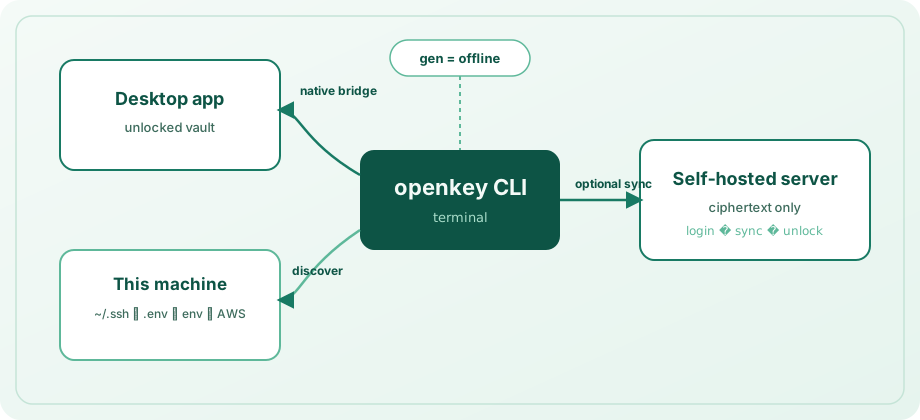
| Mode | Requirement | Role |
|---|---|---|
| Offline | Nothing | openkey gen — cryptographically useful passwords with no network and no unlocked vault |
| Native bridge | Desktop app unlocked on this machine | Default path for secrets, discovery import, and search across secrets and logins |
| CLI session | login + eval $(openkey unlock) | Local ciphertext cache and sync when the desktop app is not available |
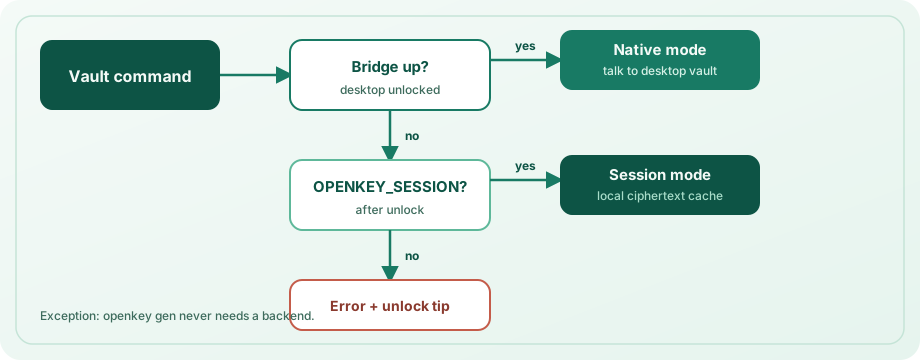
The CLI prefers the bridge when it is up. Otherwise it uses OPENKEY_SESSION. The bridge is local-only and refuses work while the vault is locked — the same trust boundary as the desktop session.
Offline generation
openkey gen -l 24 --no-symbols
openkey gen -l 32 -a -c          # avoid Il1O0o, copy to clipboard
openkey --json gen -l 20
Tune length and character classes (--no-upper, --no-lower, --no-digits, --no-symbols), or copy straight to the clipboard with -c. No app unlock and no server registration are required.
Discovery into a device group
openkey discover --dry-run
openkey discover -y
openkey discover -d workstation -p ~/src/acme --depth 3 --no-aws
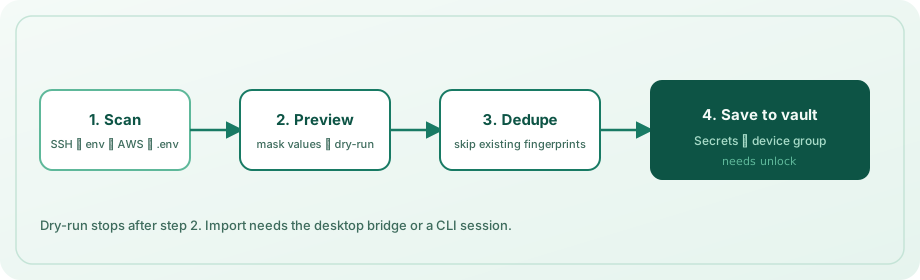
Discovery can scan:
- Private keys under
~/.ssh(with sibling.pubfiles when present) - Well-known and secret-like process environment variables
- AWS shared credentials
.env/.env.*trees from one or more project roots
Results are grouped under a device label (hostname by default) inside the vault’s Secrets section. Already-imported values are skipped by content fingerprint. Use --dry-run to preview; -y to import without a prompt. Saving still needs the desktop app unlocked (or a CLI session).
Day-to-day secret operations
Secrets are typed records: apiToken (default), sshKey, envSnippet, or other.
openkey secret add --name "GitHub PAT" --kind apiToken --secret ghp_...
openkey secret add -n "deploy" -k sshKey -f ~/.ssh/id_ed25519 \
  --public-key-file ~/.ssh/id_ed25519.pub
openkey secret list
openkey secret get "GitHub"
openkey secret copy ghp
openkey secret rm "old token" -y
List and search mask values. Use get / copy only when plaintext is required. Queries match name, host, or UUID prefix; ambiguous matches list candidates instead of guessing.
To search secrets and login entries together:
openkey search github
openkey get "GitHub"
openkey copy api.example.com
Optional self-hosted sync
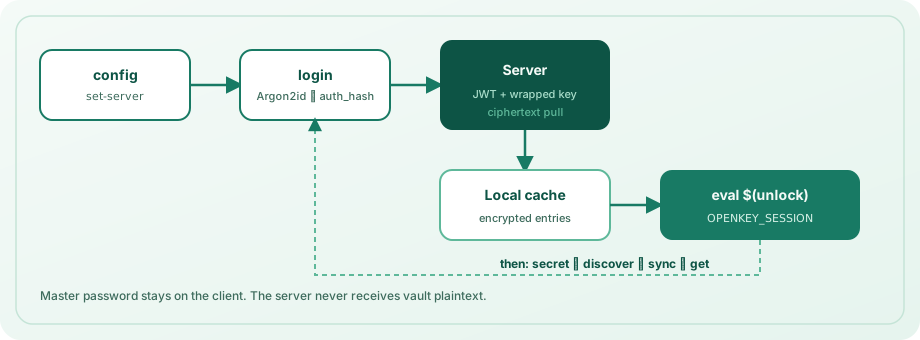
openkey config set-server https://openkey.example.com
openkey login --email [email protected]
eval $(openkey unlock)
openkey sync
eval $(openkey lock)
Login derives an auth_hash with Argon2id, never sends the master password as a flag, stores only wrapped keys and ciphertext in the CLI cache, and prints an OPENKEY_SESSION export from unlock (default lifetime 15 minutes; change with openkey config set-lock). For CI you may set OPENKEY_PASSWORD; prefer the interactive prompt on personal machines.
Inspect state anytime:
openkey status
openkey config show
Why this belongs in a password manager
Developers live in terminals. A CLI that writes into the same encrypted Secrets area as the app — and the same ciphertext-only sync API — keeps workflow and threat model aligned. You do not maintain a second secrets store for scripts.
Install
cd openkey_cli
npm install && npm run build
npm link   # optional
Requires Node.js 20+. Full command reference, environment variables, config paths, and security notes: CLI guide.