
Security
OpenKey is designed so the server cannot read your vault.
Key derivation
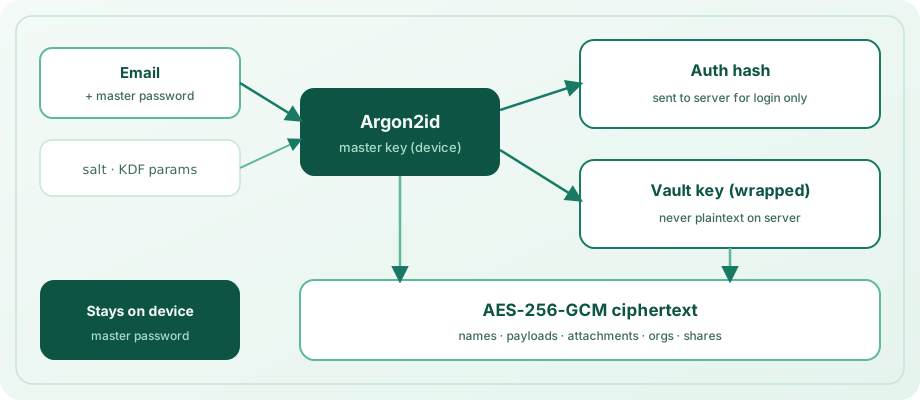
Argon2id(email + master_password, salt)produces a master key.- The master key derives an auth hash (sent to the server for login) and wraps the vault key.
- The vault key encrypts collection names and entry payloads (AES-256-GCM).
- The local database encryption key is derived from the vault key.
- The master password never leaves the device.
What the server stores
| Stored | Not stored |
|---|---|
auth_hash | Master password |
| Salt and KDF parameters | Plaintext vault key |
| Wrapped (encrypted) vault key | Decrypted collection names |
| Opaque ciphertext for vault data, attachments, orgs, shares | Plaintext entry payloads |
Org shared entries (encrypted_payload under org collections) | Org key plaintext (clients unwrap via wrapped org keys) |
Soft-deleted vault items remain as tombstones until peers sync; last-write-wins uses per-item revision.
Tokens
- Access JWTs are short-lived.
- Refresh tokens are hashed at rest and rotated on use.
- Auth endpoints are rate-limited per client IP.
Threat model
Trust boundaries
| Component | Trust assumption |
|---|---|
| Device / local vault | Root of trust while unlocked; OS user can read memory and the encrypted DB file |
| Self-hosted sync server | Untrusted for confidentiality — ciphertext only; trusted for availability and auth-hash comparison |
| Browser extension | Trusted with vault plaintext after unlock; untrusted web pages must not receive secrets beyond intentional autofill. <all_urls> is required for universal fill/capture/WebAuthn — see Browser extension. |
| Native messaging host | Local-only bridge to the unlocked desktop app; unlocked-vault responses only |
| CLI / desktop bridge | Same local trust as the unlocked app session |
| Nearby / LAN pairing | Paired peers share a session key; after vault link, they exchange vault-key material and sync ciphertext. Pairing alone does not share the vault key. Control UDP (pair_please / sync_please) is unicast; wrong pairing codes are rate-limited; sync_please only accepted from known peer endpoints |
| Desktop native messaging | Unlocked app exposes a local socket to the browser host; requests require a per-unlock openkey-native.token (mode 0600). An unlocked desktop session is full vault access for that OS user |
What attackers can and cannot do
| Attacker | Can | Cannot (by design) |
|---|---|---|
| Compromised server admin | Delete/withhold ciphertext, replace blobs, observe metadata (email, sizes, timings) | Decrypt vault entries, recover the master password from auth_hash alone |
| Network MITM (no TLS) | Intercept JWTs and ciphertext in transit | Read plaintext without the vault key |
| Stolen locked device | Offline-attack the Argon2id-wrapped vault (strong master password required) | Unlock without the master password / biometrics wrap |
| Stolen unlocked device | Read vault plaintext from memory / active session | — (out of scope) |
| Malicious webpage | Trigger autofill UI; attempt phishing | Read the full vault via content scripts without user/extension mediation |
| Malicious org/share peer | Share ciphertext they can decrypt with keys you wrapped for them | Decrypt unrelated personal vault items |
| Malicious Nearby peer | Send entries / claim LAN Pro / receive vault ciphertext after link | Unlock Pro on store-IAP platforms (Android/iOS/macOS ignore LAN Pro); decrypt LAN ciphertext without the shared vault key |
Explicit non-goals
- No master-password recovery — if you lose it, ciphertext is unrecoverable.
- Server cannot decrypt vault, attachment, org, or share payloads.
- Sync is LWW by revision, not a CRDT — concurrent edits can overwrite; the server echoes winning rows when a stale push loses. Nearby LAN vault sync uses the same LWW rule between paired, vault-linked devices (not a substitute for offline backups).
- LAN Pro attestation is a convenience between paired devices on platforms without store IAP — not a cryptographic proof of purchase.
Operational hardening checklist
- Set a strong unique
JWT_SECRET(min 32 chars; placeholders rejected at startup). - Terminate HTTPS in front of the API in production.
- Keep
CORS_ORIGINSan explicit allow-list (never*). - When running multiple API workers, add reverse-proxy rate limits — in-process auth limits are per worker (see Install the server).
- Prefer HTTPS with a valid certificate; clients do not pin certs — HTTP or bad TLS enables MITM on sync/login.
- Prefer keeping the vault locked when idle; enable biometric unlock carefully.
- Enable Settings → Security → Autofill so the OS / browser can fill only after you unlock.
- Treat exports / backups as secret material — store offline and encrypted.
- Pair Nearby devices only with people/devices you trust; Link vault shares vault-key material over the LAN session — unpair to revoke LAN Pro claims and stop sync.
- Report vulnerabilities privately — see Reporting vulnerabilities.
App store / About legal pages: Privacy Policy · Terms of Service.
Reporting vulnerabilities
If you believe you found a security issue in OpenKey (server, extension, CLI, docs, or app), report it privately.
Do not open a public GitHub issue for exploitable vulnerabilities.
- Email: [email protected]
- Or open a private security advisory under OpenSelfHosting
Include the affected package, version/commit if known, steps to reproduce, and impact. We aim to acknowledge reports within 7 days. Full policy: package file SECURITY.md (also at the monorepo root).
Practical rules
- Choose a strong master password — it is the root of trust.
- Keep
JWT_SECRET(server) long and unique; placeholders are rejected at startup. - Prefer HTTPS in production and lock down
CORS_ORIGINS(no*). - Back up your vault export / recovery materials offline.
Packaging note
Published packages include the server, browser extension, CLI, and docs (MIT), plus the protocol spec in OpenSelfHosting/OpenKey. The official mobile/desktop app is proprietary; install binaries from Download. See the overview and packages guides.
For API details, see the openkey_server package README and /docs on a running server.