
CLI
OpenKey CLI (openkey) সেই developers-এর জন্য একটি command-line interface যারা secrets, API tokens, SSH keys, এবং .env উপাদান OpenKey ভল্টে রাখেন। এটি password generation-এর জন্য সম্পূর্ণ offline চলতে পারে, স্থানীয় native bridge-এ unlocked OpenKey desktop অ্যাপ-এর সাথে কথা বলতে পারে, এবং ciphertext pull ও একটি short-lived CLI session-এর জন্য ঐচ্ছিকভাবে self-hosted sync server-এ authenticate করতে পারে।
Node.js 20+ প্রয়োজন।
Architecture
নিচের diagram দেখায় কে কার সাথে কথা বলে। Password generation offline থাকে। Vault commands unlocked desktop অ্যাপকে অগ্রাধিকার দেয়। Server sync ঐচ্ছিক।
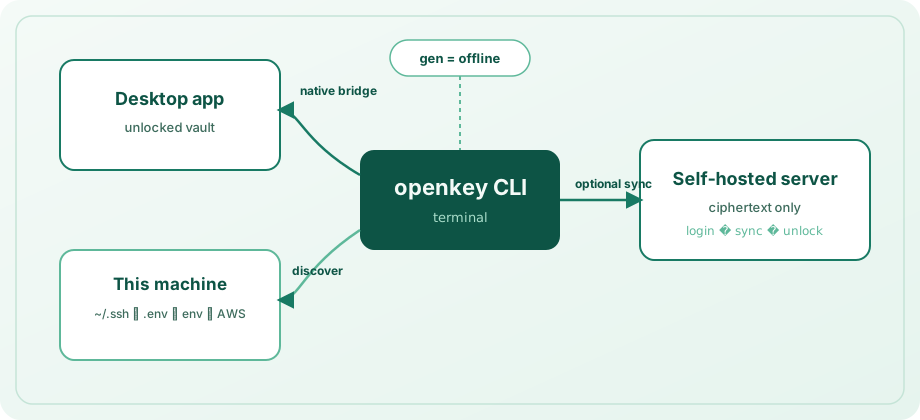
| Mode | When it applies | What it can do |
|---|---|---|
| Offline | Always | gen — no app, no server |
| Native bridge | Desktop app unlocked on this machine | Secrets CRUD, discovery import, search/get/copy across secrets and logins |
| CLI session | After login + eval $(openkey unlock) | Same vault operations against a local ciphertext cache; sync pulls from the server |
Vault command backend কীভাবে বেছে নেয়
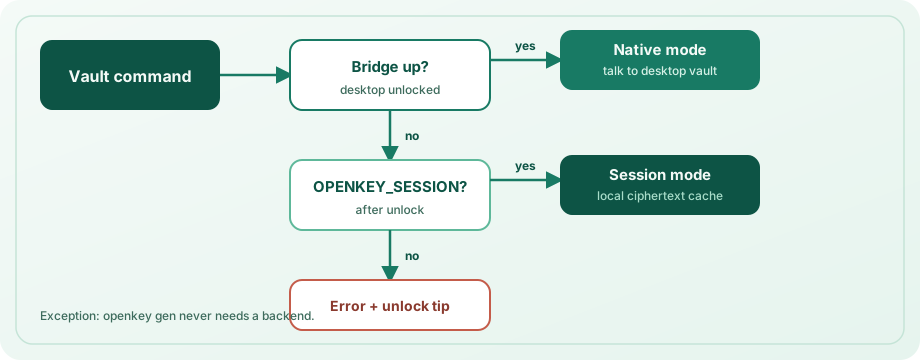
- Desktop bridge জবাব দিলে → native mode ব্যবহার করুন (অগ্রাধিকার; server registration লাগে না)।
- অন্যথায়
OPENKEY_SESSIONসেট ও valid হলে → session mode (local cache / server-backed material)। - অন্যথায় → vault লাগে এমন commands unlock tip সহ fail — অ্যাপ unlock করুন বা
eval $(openkey unlock)চালান।
Bridge সংযোগ শুধু local machine থেকে গ্রহণ করে এবং শুধু ভল্ট unlocked থাকলে। Unix-এ পরিচিত OpenKey paths-এর নিচে socket (OPENKEY_NATIVE_SOCKET দিয়ে override)। Windows-এ %LOCALAPPDATA%\OpenKey\-এর নিচে localhost port file (OPENKEY_NATIVE_PORT দিয়ে override)।
Install
cd openkey_cli
npm install
npm run build
npm link          # optional: puts `openkey` on your PATH
Linking ছাড়া:
npx tsx src/cli.ts --help
# after build:
node dist/cli.js --help
Verify:
openkey --version
openkey status
Configuration and storage
স্থানীয় CLI state platform config directory-তে সংরক্ষিত (supported হলে file mode 600):
| Platform | Path |
|---|---|
| macOS | ~/Library/Application Support/OpenKey/config.json |
| Linux | ~/.config/openkey/config.json (or $XDG_CONFIG_HOME/openkey/) |
| Windows | %APPDATA%\OpenKey\config.json |
ফাইলে থাকতে পারে: server URL, email, access/refresh tokens, salt ও KDF params, wrapped vault key, session lock duration, server revision, এবং sync-এর পর entries/collections-এর ciphertext cache। এটি মাস্টার পাসওয়ার্ড plaintext-এ সংরক্ষণ করে না।
config commands
openkey config set-server https://openkey.example.com
openkey config show
openkey config set-lock 30 # session lifetime in minutes (1–1440, default 15)set-server-এhttp://বাhttps://দিয়ে শুরু URL লাগে (trailing slash সরানো হয়)।- প্রথম set-এর আগে default server URL:
http://localhost:8000।
Global options
| Flag | Effect |
|---|---|
--json | Machine-readable JSON on stdout for scripting |
--help / --version | Help and version |
Commander globals ব্যবহারে --json subcommand-এর আগে রাখুন, যেমন openkey --json status।
Password generation (gen)
সম্পূর্ণ offline। অ্যাপ বা server লাগে না।
openkey gen
openkey gen -l 24 --no-symbols
openkey gen -l 32 -a -c
openkey --json gen -l 20| Option | Description | Default |
|---|---|---|
-l, --length <n> | Length (practical range 4–64) | 20 |
--no-upper | Exclude uppercase letters | off |
--no-lower | Exclude lowercase letters | off |
--no-digits | Exclude digits | off |
--no-symbols | Exclude symbols | off |
-a, --avoid-ambiguous | Avoid ambiguous characters Il1O0o | off |
-c, --copy | Copy to clipboard instead of printing | off |
-c সহ human mode confirmation প্রিন্ট করে; JSON mode { "copied": true, "length": N } দেয়। -c ছাড়া password প্রিন্ট (বা JSON mode-এ { "password": "..." })।
Status and hygiene
openkey status
openkey forget
status server URL, email, login state, bridge availability, unlock mode (native / session), বাকি session time, এবং cached entry count রিপোর্ট করে।
forget স্থানীয় CLI config ও cached ciphertext মুছে। desktop অ্যাপ ভল্টের ভিতরের secrets মুছে না। forget-এর পর server mode ব্যবহার করলে config set-server / login আবার চালান।
Developer secrets (secret)
Secrets ভল্টের reserved Secrets অঞ্চলে (__dev_secrets__) থাকে, device (machine label; default hostname) দিয়ে গোষ্ঠীভুক্ত। Commands-এ desktop অ্যাপ unlocked অথবা valid OPENKEY_SESSION লাগে।
Kinds
| Kind | Typical use | Notes |
|---|---|---|
apiToken | PAT, API keys | Default |
sshKey | Private keys | Prefer --file / --public-key-file |
envSnippet | Full .env bodies | Prefer --file |
other | Catch-all | — |
ssh, api, token, env, .env ইত্যাদি alias উপরের kinds-এ normalize হয়।
secret add
openkey secret add --name "GitHub PAT" --kind apiToken --secret ghp_...
openkey secret add -n "deploy key" -k sshKey -f ~/.ssh/id_ed25519 \
  --public-key-file ~/.ssh/id_ed25519.pub -H git.example.com -u git
openkey secret add -n "acme .env" -k envSnippet -f ./apps/api/.env -d laptop| Option | Description |
|---|---|
-n, --name | Display name (required) |
-k, --kind | sshKey | apiToken | envSnippet | other |
-s, --secret | Inline secret value (- reads stdin) |
-f, --file | Read secret body from a file |
--stdin | Read secret from stdin (prefer over putting tokens in argv) |
-u, --username | Optional username |
-H, --host | Optional host |
-d, --device | Device collection label (default: hostname) |
--public-key / --public-key-file | SSH public key |
--passphrase | Key passphrase |
--notes | Free-form notes |
--secret, --file, বা --stdin (non-empty) দিন। তৈরি records UUID দেয়।
printf '%s' "$TOKEN" | openkey secret add -n "CI token" --stdinsecret list / get / copy / rm / update / export / devices
openkey secret list
openkey secret list -d laptop -k apiToken
openkey secret get "GitHub"
openkey secret copy ghp
openkey secret update "GitHub PAT" --secret ghp_new...
printf '%s' "$TOKEN" | openkey secret update "GitHub PAT" --stdin
openkey secret export -d laptop -o .env.local
openkey secret export --format exports   # for eval
openkey secret devices
openkey secret rm "old token" -y- list — UUID prefix, name, kind, device, masked secret-এর table। ঐচ্ছিক
-d/--deviceও-k/--kindfilters। - get / copy / rm / update — name, host, বা UUID prefix দিয়ে match। একাধিক substring match হলে exact name/title, host, বা unique UUID prefix (≥4 chars) জয়ী; অন্যথায় command candidates সহ error।
- update — শুধু যে flags দেন সেগুলো patch (
--name,--secret/--file/--stdin,--kind,--device, …)। Desktop bridgeupdateSecrethandler (এই release-এর OpenKey অ্যাপ) বা CLI session লাগে। - export — secrets dotenv (
KEY=value;envSnippetbodies inlined) বা--format exportsshell lines হিসেবে লিখুন।-osupported হলে mode-600ফাইল লেখে। - devices — device collection labels ও counts তালিকা।
- get plaintext প্রিন্ট (বা
--jsonmode-এ full JSON object)। - copy plaintext clipboard-এ লেখে।
- rm
-y/--yesছাড়া prompt।
Shell-এ secrets inject (env / run)
# Print export lines for eval (NAME or NAME=query)
eval $(openkey env DATABASE_URL)
eval $(openkey env DB=DATABASE_URL GH="GitHub PAT")

# Or run a child process with secrets in its environment
openkey run -e DATABASE_URL -e GH="GitHub PAT" -- npm start| Form | Meaning |
|---|---|
NAME | Env var NAME; vault item সেই name দিয়ে খুঁজুন |
NAME=query | Env var NAME; query (name / host / UUID) দিয়ে খুঁজুন |
env-এ --json env, query, name, uuid, ও value সহ objects দেয়। --raw একটি plaintext value প্রিন্ট (ঠিক এক binding)।
Discovery (discover)
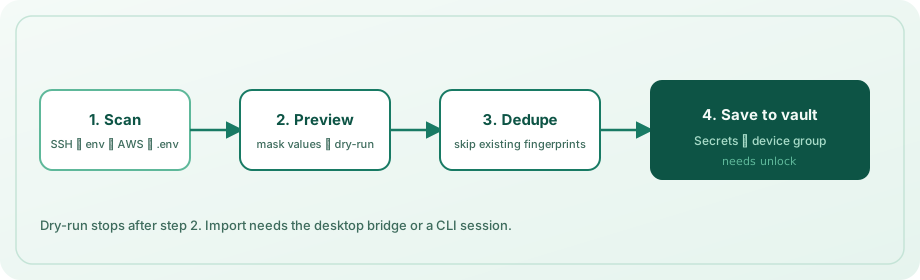
এই মেশিন scan করে নতুন secrets device group-এ import করে। ভল্টে আগে থাকা values-এর বিরুদ্ধে deduplicate (kind + name + content fingerprint)।
openkey discover --dry-run
openkey discover -y
openkey discover -d workstation -p ~/src/acme -p ~/src/labs --depth 3
openkey discover --no-aws --no-env-vars| Option | Description | Default |
|---|---|---|
-d, --device | Device collection name | hostname |
-p, --path <dir> | Project root(s) for .env walk (repeatable) | cwd |
--depth <n> | Max directory depth for .env | 4 |
--no-ssh | Skip ~/.ssh private keys | scan on |
--no-env-files | Skip .env / .env.* files | scan on |
--no-env-vars | Skip process environment | scan on |
--no-aws | Skip ~/.aws/credentials | scan on |
--no-gh | Skip GitHub CLI hosts.yml tokens | scan on |
--no-docker | Skip ~/.docker/config.json registry auth | scan on |
--dry-run | List only; do not save | off |
-y, --yes | Import without interactive confirm | off |
কী scan হয়
- SSH —
~/.ssh-এর নিচে private keys (known_hosts,authorized_keys,config,.pubskip); থাকলে sibling.pubattach। - Environment variables — well-known names (
GITHUB_TOKEN,OPENAI_API_KEY,DATABASE_URL, …) ও secret-like suffix match;PATH,HOME,OPENKEY_SESSION,OPENKEY_PASSWORDইত্যাদি skip। - AWS —
~/.aws/credentials-এ profiles। - GitHub CLI —
~/.config/gh/hosts.yml-এoauth_token/tokenentries। - Docker —
~/.docker/config.jsonথেকে decodedauths। .envfiles — roots থেকে walk,node_modules,.git,dist, virtualenvs ইত্যাদি skip; size ও file-count limits প্রযোজ্য।
Dry-run ভল্ট locked থাকলেও কাজ করে (শুধু listing)। Saving-এ bridge বা session unlock লাগে। আগে import করা secrets skipped হিসেবে রিপোর্ট।
Secrets ও logins-এ search
এই commands developer secrets ও login entries খোঁজে:
openkey search github
openkey get "GitHub"
openkey get "GitHub" --field username
openkey copy api.example.com --field totp
openkey totp "GitHub" -c
openkey logins| Command | Output |
|---|---|
search <query> | Masked table (বা JSON previews); TOTP availability দেখায় |
get <query> | Best-match field (--field password|username|url|totp|notes) |
copy <query> | সেই field-এর clipboard copy (45s-এ auto-clear; --keep দিয়ে disable) |
totp <query> | Live TOTP code (-c copy, -w watch until Ctrl+C) |
logins | Username / URL / TOTP flag সহ logins তালিকা |
doctor | Node, config permissions, bridge, session, server /health, clipboard diagnose |
অস্পষ্ট substring matches exact name/title, host, বা unique UUID prefix-কে অগ্রাধিকার; অন্যথায় UUID, kind, label তালিকা — query refine করুন। শুধু Secrets section চাইলে secret get / secret copy অগ্রাধিকার।
Name + device দিয়ে upsert-এ secret set। sync --push pull-এর আগে local ciphertext cache push।
ঐচ্ছিক self-hosted server
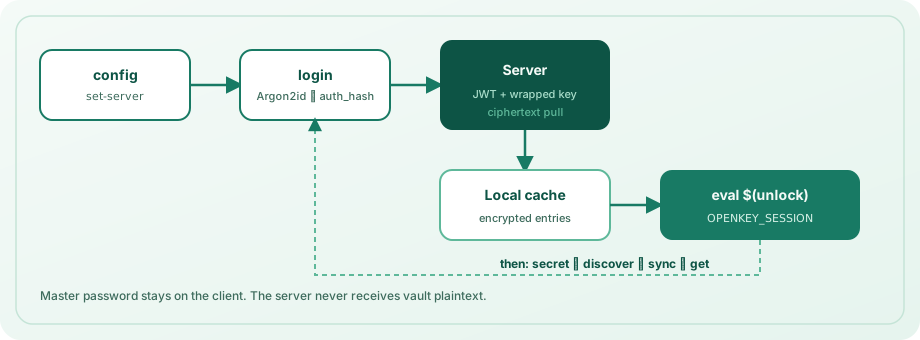
এই path ব্যবহার করুন যখন desktop অ্যাপ মেশিনে নেই (উদাহরণ: sync দিয়ে phone-only vault access), বা CLI ciphertext cache চান।
openkey config set-server http://localhost:8000
openkey login --email [email protected]
eval $(openkey unlock)
openkey sync
Server install: সার্ভার ইনস্টল।
Authentication flow
login— email (বা-e) ও মাস্টার পাসওয়ার্ড (বাOPENKEY_PASSWORD) prompt। Salt/KDF-এর জন্য prelogin, Argon2id দিয়েauth_hashderive, JWTs, wrapped vault key material fetch, unwrapping-এ password verify, তারপর local cache-এ ciphertext pull। মাস্টার পাসওয়ার্ড CLI flag হিসেবে কখনো পাঠাবেন না।unlock— vault key আবার derive, server reachable হলে tokens/sync refresh,OPENKEY_SESSION-এর shell export প্রিন্ট (eval $(openkey unlock)ব্যবহার)। Options:-e/--email,--raw(token only)। JSON mode session fields emit।lock—unset OPENKEY_SESSIONপ্রিন্ট (বা JSON hint) যাতেeval $(openkey lock)চালানো যায়।logout— access/refresh tokens সাফ; local ciphertext cache রাখে। Session env সাফ করতেlock-এর সাথে pair।sync— login লাগে; entries/collections pull ওserverRevisionupdate।
Session lifetime default 15 minutes (config set-lock)। Expired sessions-এ আবার unlock লাগে।
Environment variables
| Variable | Purpose |
|---|---|
OPENKEY_SESSION | unlock থেকে short-lived encrypted session blob |
OPENKEY_PASSWORD | non-interactive login / unlock-এর মাস্টার পাসওয়ার্ড (scripts/CI only) |
OPENKEY_EMAIL | non-interactive login / unlock-এর account email |
OPENKEY_NATIVE_SOCKET | Unix bridge socket path override |
OPENKEY_NATIVE_PORT | Windows bridge port override |
Personal machines-এ interactive password prompt অগ্রাধিকার। CI logs-এ OPENKEY_PASSWORD ও session tokens secret material হিসেবে ধরুন।
Shell completions
eval "$(openkey completion bash)"
eval "$(openkey completion zsh)"
openkey completion fish | source
Command reference
| Command | Needs vault access? | Description |
|---|---|---|
gen | No | Offline password generation |
discover | Save: yes* / dry-run: no | Scan SSH / .env / env / AWS → device group |
secret add|list|get|copy|rm|update|export|devices | Yes* | Developer secrets |
get / copy / search / totp / logins | Yes* | Secrets + logins (TOTP, field select) |
doctor | No | Diagnose bridge / session / server |
env / run | Yes* | Export secrets into shell / child process |
completion | No | Bash / zsh / fish completions |
status | No | Bridge / session / server state |
config set-server|show|set-lock | No | CLI configuration |
login / logout | — | Optional server auth |
unlock / lock | — | Optional CLI session |
sync | Login required | Pull ciphertext from server |
forget | No | Wipe local CLI config + cache |
*Desktop অ্যাপ unlocked, অথবা server login-এর পর valid OPENKEY_SESSION।
Security model
- List/search commands values mask করে; plaintext লাগলে তবেই
get/copy। - Sync server শুধু ciphertext সংরক্ষণ; CLI keys locally derive করে অন্যান্য OpenKey clients-এর মতো।
- মাস্টার পাসওয়ার্ড flag হিসেবে পাঠাবেন না;
OPENKEY_PASSWORDবাOPENKEY_SESSIONlog করবেন না। - Bridge traffic local-only; unlocked vault লাগে।
- Session tokens expire; shared machines-এ
config set-lockদিয়ে lifetime কমান। forgetdisk-এ CLI state সাফ; মেশিন untrusted হলেlogoutদিয়ে server tokens rotate।
Development
cd openkey_cli
npm test
npm run typecheck
npm run build
Related guides
- অ্যাপ ব্যবহার — desktop unlock, Secrets section, autofill
- সার্ভার ইনস্টল — self-hosted sync
- Security — Argon2id, tokens, threat model
- Packages — repository layout